
Windows 10 still works, but regular support ended on October 14, 2025. For eligible personal PCs, Microsoft offers Extended Security Updates (ESU): important security updates through October 12, 2027. You can enroll at no additional cost by syncing your PC settings. This guide covers eligibility, the enrollment button, and what to check if it does not appear.
What is Windows 10 ESU?
Extended Security Updates (ESU) is a Microsoft program that keeps delivering critical and important security fixes through Windows Update to enrolled devices. It is useful if your PC does not meet Windows 11 requirements or you need more time to decide when to upgrade your system or computer.
The important distinction: regular Windows 10 support has not returned. ESU does not add new features, performance improvements, interface changes, or technical support. It reduces exposure to known vulnerabilities while you plan your next step; it does not turn an older system into a new one.
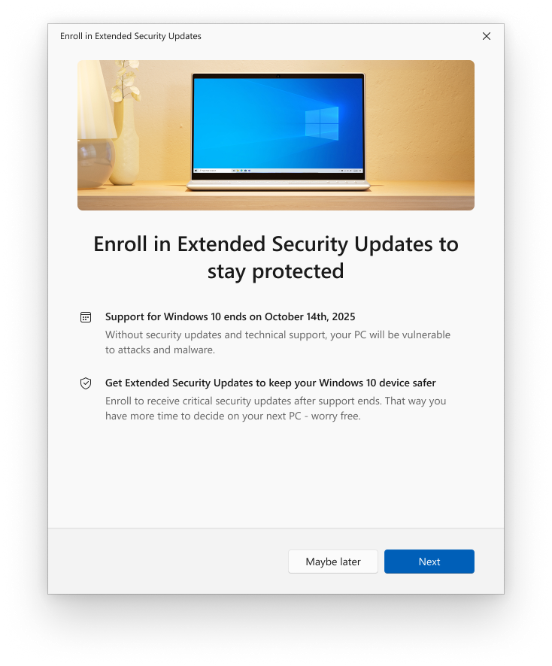
💡 The screenshot above is an official interface image published in 2025. Its regular-support end date remains correct, while the current ESU coverage date is October 12, 2027, according to Microsoft’s updated page. Wording and appearance may vary on your PC.
Who can enroll in ESU for free?
The consumer program requires Windows 10 version 22H2 in Home, Pro, Pro Education, or Pro for Workstations editions, with recent updates installed. The Microsoft account used to enroll must have administrator rights on the PC and cannot be a child account. If you use a local account, the wizard may ask you to sign in with a Microsoft account during enrollment.
To check your version without installing anything, press Win + R, type winver, and press Enter. Look for “Version 22H2.” Then open Settings → Update & Security → Windows Update and install available updates, restarting when prompted.
⚠️ This enrollment is for personal use. PCs managed by a company, Active Directory domain, Microsoft Entra, or MDM may not be offered this option; organizations have separate licensing rules. ESU is also not a free Windows license or a way to activate an unlicensed installation.
How much does it cost? Understanding the free option
On its consumer ESU page, Microsoft lists three enrollment methods: no additional cost when syncing PC settings, redeeming 1,000 Microsoft Rewards points, or making a one-time $30 USD payment or local equivalent plus tax. The options provide coverage through the same date. Check the options and pricing displayed in your own enrollment wizard before confirming.
Syncing settings is not the same thing as automatically uploading every personal folder to the cloud. In Windows Backup, you can review folder, app, and preference options separately; check what each switch enables before confirming. Microsoft’s Windows Backup guide explains these categories and shows the interface.
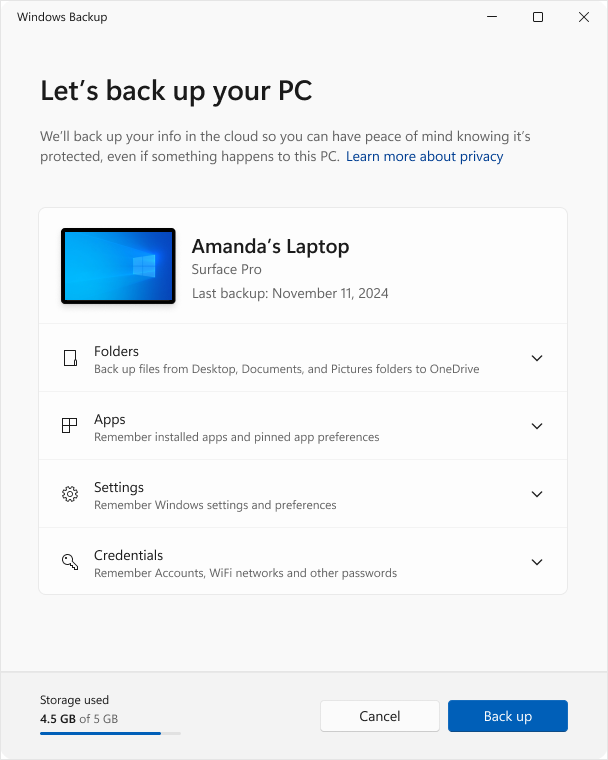
In Microsoft’s screenshot above, Settings refers to preferences, while Folders handles OneDrive folders. Read Microsoft’s Windows Backup guide if you want to review these choices before enrolling.
Tutorial: how to enroll in ESU in 5 steps
Step 1 — check your version and updates. Use winver to confirm Windows 10 22H2. Then check Windows Update and restart if needed. Do not skip this step: without recent components, the enrollment wizard may not appear.
Step 2 — open Windows Update. Go to Settings → Update & Security → Windows Update. On an eligible device, look for the Extended Security Updates notice and the “Enroll now” link or its localized equivalent. You do not need an activation tool from a third-party site.
The image above shows where the button usually appears. It is an older illustrative screenshot in English; “support ends in October 2025” refers to regular support. Consumer ESU coverage for eligible devices was subsequently extended through October 2027.
Step 3 — sign in with your Microsoft account. Select the enrollment link and follow the wizard. If you use a local Windows account, it may ask you to sign in with a Microsoft account; that account must have administrator permissions to register the device.
Step 4 — choose enrollment at no additional cost. If available, choose to sync your PC settings and review the backup options shown on screen. Rewards or a one-time payment may also appear; select the method you intend to use.
Step 5 — confirm and check status. Complete the wizard and return to Windows Update. Microsoft says this is where you can check the device’s enrollment status at any time. Keep automatic updates enabled to receive fixes as they become available.
What if “Enroll now” is missing?
First, confirm 22H2, an eligible edition, an administrator Microsoft account, and current updates. Restart after updating and check Windows Update again. If the PC belongs to your company or is organization-managed, consumer enrollment may not be offered.
In September 2026, Microsoft published the KB5126256 preparation package, which updates licensing and enrollment components. Windows Update delivers it automatically when prerequisites are met. Installing this package alone does not enroll your PC in ESU: you must still finish the wizard. Review the update prerequisites and installation order on the official KB5126256 page before attempting a manual installation.
Avoid scripts that promise to “force” ESU, edit the registry, or bypass eligibility. They do not replace official enrollment and may make troubleshooting harder. If everything looks correct and the link remains missing, note your edition, version, and installed updates, then use official documentation and support as your starting point.
Quick questions about Windows 10 through 2027
Already enrolled: do I need to sign up again? No. Microsoft says existing enrollment continues automatically through October 12, 2027. You can verify status in Windows Update.
Will Windows 10 stop working after that date? There is no automatic shutdown tied to the deadline. The point is that the consumer security update program has an end date; using a system without fixes increases exposure to vulnerabilities.
Will ESU boost FPS or speed up my PC? That is not its purpose. It delivers security fixes, without new features or performance claims. If your PC is slow, investigate storage, startup programs, temperature, and drivers separately.
Can I use it on more than one PC? The same consumer ESU license can be used on up to 10 eligible devices linked to the Microsoft account used for enrollment. Add each additional PC through its own Windows Update page.
Is it worth enrolling?
If you plan to stay on Windows 10, yes: receiving security fixes is preferable to going without them, especially when eligible personal PCs have a no-additional-cost option. Set the right expectation: ESU gives you time to plan a move, but it does not replace a fully supported system.
Technical details and sources
📦 Program: Windows 10 Extended Security Updates (ESU)
⚙️ Requirements: Windows 10 22H2, eligible consumer edition, and current updates
🗓️ Consumer coverage: through October 12, 2027
👨💻 Provider: Microsoft
🔗 Official ESU page · KB5126256 preparation package · Windows Backup guide
Conclusion
The path is straightforward: confirm Windows 10 22H2, update your system, open Windows Update, select Enroll now, and complete your chosen enrollment method. Syncing settings lets eligible personal PCs enroll at no additional cost. Security coverage runs through October 12, 2027; if you enrolled earlier, it continues automatically. Check Microsoft’s official ESU page for current terms.
Community comments
Continue the conversation around this article.
Loading comments...